
Changing car settings (tuning) | Basic Information: NFS: PS Guide
Last update: 11 May 2016
Changing car settings (tuning)
This is the magic of NFS - the new parts, setting the engines and other things, the windtunnel - this world may enrapture for longer than the races themselves. To win, a great car doesn't suffice - you must invest in new, better parts and set them up.
 |  |
#1 | #2 |
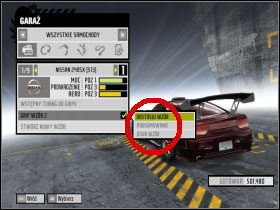
Lets start with the Garage, in which you have access to all your cars[#1]. The cars are divided by competition mode. Next to each car there's information regarding HP, handling and aerodynamics. Plus, each car has three settings slots - thus, you can make three versions of your car and change groups of settings when you want (you just can't change or check the settings for won cars, but you can make your own settings for them) To change the settings, choose the pattern you want, and adjust it [#2]. Welcome to a land of opportunity.
Quick Tweaking
Gives you an opportunity to buy a whole packages which saves you time - if you have the cash, use it, although I advise buying single parts according to your needs.
Your Own Upgrades:
 |  |
#1 | #2 |
Welcome home! This is a vault of car parts. You can buy parts in the following categories: [#1]:
- Engine - affects power;
- Drivetrain - affects power;
- Forced Induction - affects power;
- Suspension - affects handling;
- Brakes - affects handling;
- Tires - affects handling;
- Nitrous Oxide - affects power, adds nitro.
- Body - affects aerodynamics; by buying a new part (like a hood or a spoiler) you can change it's windtunnel features (more about this later) The most important thing here's the body kit - raises aerodynamics considerably [#2]
- Visuals - Don't affect the stats of the car, although it allows some personalizations - paintjob, window tint, stickers, decals etc...
Remember that most parts have 3 levels. Try to buy parts with roughly the same level: don't buy a 3rd level Engine and Drivetrain and leave the Tires and Suspension at level 1 ( They simply can't handle that much power) At first, when you're short on cash, buy several parts from a new level. When you've completed level 2, start buying level 3 equipment.
While plowing through Race Days, upgrade your car gradually. Pay attention as to whether you've won any parts, which could prove useful (sometimes, a 4th level part becomes available.) Oh, and one more thing: most expensive DOES NOT equal the best.
Tuning
 |  |
#1 | #2 |
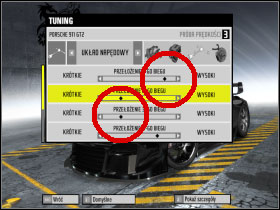
After buying better parts, you gain access to your car settings[#1]. You can change them in three tabs: Suspension, Engine, Drivetrain and Brakes. Remember, that you have to buy some parts - stock parts won't grant you access to tuning. Each tab has several options to set. Everything's done with the scrollbars. [#2] the better the part, the bigger the room the scrollbar has. Clicking 2 on each of the options will give you more information.
General Remarks regarding the settings:
1. Suspension - all the options regarding stiffness depend on what car is in question and what you want to use it for. Balance it for Grip of Drift. Stiffen it for Drag and Time Attacks. Suspension Height depends on how well the car sticks to the road, although I recommend setting medium to low (especially for Time Attacks), although this depends on other settings as well. Set Tire Air Pressure to a fairly low level for better grip. The question of balancing the other options is an individual decision. Power Steering also depends on what the car is for. Set to Stiff if the car is for Time Attacks or Drag. Set to Soft for Grip or Drift.
2. Engine - Set the camshaft phase to the right for a car that's supposed to go fast, for acceleration set it to the left. All settings regarding turbo or nitro you should max out. Just don't forget the tires.
3. Drivetrain - This is just gear control. Very important in Drag. If you see that one of the gears is too short and you have no time to shift in the RPM green zone, set the corresponding scrollbar to the right. This can also play a role in Time Attacks, even if you're on Auto transmission. Improper tweaking can result in low acceleration.
4. Brakes - It's best to divide the braking strength in favor of the forward axle. Max out the pressures, but only if you've got good tires.
Dynamometric Test
 |  |
#1 | #2 |
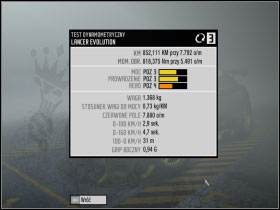
This lets you check the most fundamental info regarding the car, e.g. Horsepower, torque, braking speed or 0-60 time. Note, however, that different gameplay modes will influence the results for a given car differently. For example, the Time Attack car [#1] will have info not only about the acceleration in different speed brackets, but also your max speed. A Grip car's test results don't have this info, although it does have braking distance. [#2] This test lets you ascertain what has changed since your last round of tweaks.
Wind Tunnel
 |  |
#1 | #2 |
This lets you check the influence of aerodynamic parts on the car's possibilities. When buying a Spoiler, Hood etc. you have the capability of setting the Autosculpt [#1] Increasing this gives you better Aerodynamics, which is good for a Drag, Drift or Time Attack car [#2].